

-
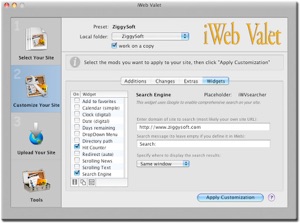
•Add many powerful widgets to your web pages, as social bookmarking buttons (Facebook, Twitter, etc.), Facebook “I Like” button, clocks, site search engines, auto-redirecting, days remaining fields, calendars, scrolling texts, navigation menus, falling snow and much more.
-
•Personalize iWeb page titles by adding a prefix of your choice.
-
•Add a favicon to your web pages.
-
•Add a Hit Counter to your web pages (with Google Analytics, Statcounter or similar).
-
•Fool Spam Bots by encoding all email addresses in your iWeb pages, so bots don’t get them for spamming.
-
•Add META tags to provide more information about your web pages and gain a top ranking on crawler-based search engines.
-
• Perform multiple 'search and replace' operations on all html files contents at once; you can easily make changes of simple text chunks as well as html tags.
-
•Encode special characters inside your web pages to solve some display anomaly in non-English texts.
-
•Change the maximum size or apply a fixed compression ratio to all JPEG images of your site.
-
•Add other folders and files not managed by iWeb (favicon, programs, documents, etc.)
-
•Preview your modified pages with your default browser at any time.
-
•Work on a temporary copy of your site folder: use it with Dreamweaver or Golive local sites as well!
-
•Backup/Restore functions to protect your iWeb sites files from accidental data loss.
And after those changes, you can upload the contents of your iWeb folder to a web site, with:
-
•Size comparison files check: iWeb Valet will only upload files that have changed (or new files). This saves time, because you will avoid, whenever you make a single change in iWeb, to re-upload the entire site.
-
•Option to remove the files in the destination when correspondent file is not present in the source directory, in order to save space in your web server.
-


UNIVERSAL

Applications are Universal Binaries and compatibles with Mac OS X 10.6 Snow Leopard
NEWS



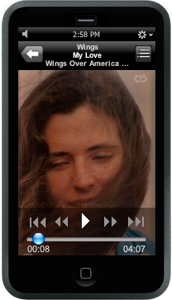
iMusic Valet allows you to either play a single music file at a time, or else it lets you continuously or randomly play all the music files within a selected directory, or within your iTunes music library.
iMusic Valet complete features will allow you to:
-
•Link your favorites pictures to your songs, to be displayed in your iMusic Valet window as you listen music.
-
•Enjoy the modern Apple's iPod-like theme.
-
•Play collections of songs in sequence or randomly.
-
•Collect songs from your iTunes music library, from your Hard Disk or from connected external devices.
-
•Create playlists containing mixed songs from multiple libraries.
-
•Have your iMusic Valet little window acting as a normal application or floating above every other application to be always accessible and showing your photos as a digital photoframe.
-
•Quickly consult the digital clock on the upper side of the iMusic Valet window, and, clicking on the clock, display a nice calendar always updated.







SHARE THIS PAGE!
Visitors

© Copyright 2011 ziggysoft.com™ - Apple and iWeb are registered trademarks of Apple Computer, Inc. | home | contact us | privacy statement
Apple, iWeb and iPod are registered trademarks of Apple Computer.